
CLINIC OPERATIONS · PRACTICAL GUIDE
Booking Rooms as Well as People: A Guide to Resource Scheduling
A practical guide to scheduling clinic rooms and equipment alongside practitioners, including shared spaces, group rooms and online sessions.

The short version
A room can be as important to a booking as the person providing the session. Map resource needs to services, test conflicts and give someone responsibility for keeping room availability current.
- Reserve the practitioner and room together where required.
- Keep online appointments distinct from on-site work.
- Review resource data before drawing conclusions about use.
7DaysCare Clinic Guides · Scheduling and operations
Who this guide is for: Clinic managers whose rooms are double-booked, hard to find or sitting empty.
Reading time: about 10 minutes.
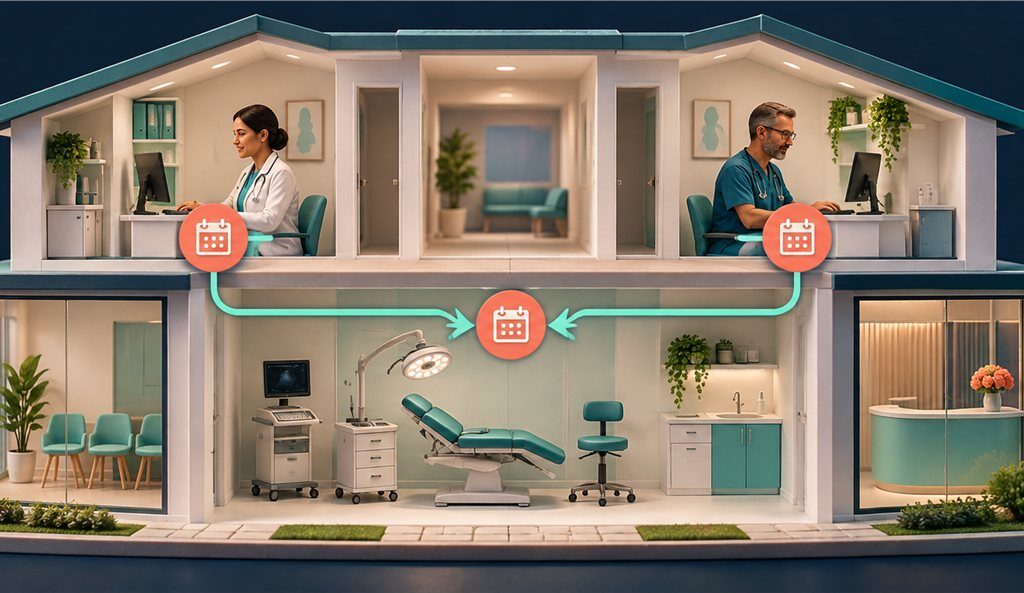
A clinic appointment may need both a practitioner and a room. This guide shows how to plan resource scheduling around the work the clinic actually does.
Two clinicians, one room, nine o’clock
Imagine two clinicians arriving for appointments at the same time. Each person is available, but the clinic has one suitable room. If the diary tracks only people, both bookings can look valid until someone reaches reception. Staff then have to move an appointment, find another room or ask a client to wait.
The reverse can happen too. A room may be reserved for a session that was moved, while another practitioner is looking for space. The room appears busy even though nobody will use it. When the schedule does not connect people and spaces, staff rely on memory, separate calendars and messages to discover what is happening.
Resource scheduling means treating rooms, equipment and other shared items as part of the booking. It does not mean every appointment needs a room. An online session may need none; an in-person assessment may need a particular room; a group workshop may need a larger space. The practice should decide what each service requires.
Start with incidents and near misses. Ask when a room conflict last happened, what was double-booked and how the team resolved it. Also ask where a room stayed empty because its reservation was not released. These examples show which resources matter and how the current process breaks down.
A booking that reserves both the practitioner and the needed space can give staff a more accurate view of capacity. The rules still need to be maintained. Someone must decide which rooms can host which services, how rooms are taken out of use and what happens when a planned resource becomes unavailable.
People have calendars; rooms usually do not
Practitioner calendars are often carefully maintained because each person controls their working hours. Rooms can be treated as background space and tracked on a whiteboard, shared spreadsheet or paper sign-up sheet. That arrangement may work for a small team until room use becomes more complex.
Rooms have their own constraints. One may be suitable for couples sessions, another may have equipment that must be booked, and a third may be reserved for group work. Some spaces are unavailable at certain times. A room may need preparation or reset time. If the schedule ignores these conditions, it can offer a session that the clinic cannot host as planned.
List every resource that can limit a booking. Begin with rooms and add equipment only when it is genuinely shared or scarce. For each resource, record its location, capacity if relevant, permitted uses, times it is unavailable and who can change its status. Avoid creating an inventory of items that do not need a reservation; extra complexity can make the booking process harder to maintain.
Ask staff how they know a room is ready. Do they need a reset interval? Are there keys or access permissions? Does a room have a recurring block for group work? The scheduling rules should reflect the practical answer, not just the room name.
A room calendar also needs an owner. Someone should update closures, maintenance, holiday use and changes in room availability. If the person who controls the spreadsheet is away, another team member should know how to check and modify it. A shared resource is only as reliable as the process for keeping its availability current.
A booking needs both
For a session that requires a room, the appointment should reserve the clinician and the space at the same time.
A valid slot exists only when both are free and the service rules allow that pairing.
If either is unavailable, the practice should not present the booking as ready to confirm.
Map the relationship between service and room.
Does every in-person session use the same rooms? Does an assessment require a specific setup? Can a group use several rooms or only one larger room? Are online appointments independent of physical rooms? Write down the rule for each service so staff can apply it consistently.
Think about changes as well as new bookings.
When a session moves, the old room needs to be released and the new room reserved. If an appointment changes from in-person to online, confirm that the room is no longer blocked. If a clinician is absent, check what happens to the room booking and whether another staff member can use it.
Test conflicts deliberately.
Try to book two appointments into the same room at the same time. Try a booking where the practitioner is available but the room is not. Try an appointment that does not need a room. Then change and cancel each booking. These checks show whether the system prevents conflicts or simply records them.
Do not use resource scheduling to make clinical decisions. A room’s availability cannot determine whether a client should receive a service. It can help the practice coordinate a physical space after the professional service and appointment requirements are understood.
Shared, group and specialist rooms
A room used by several practitioners needs shared rules.
Decide who can book it, whether certain services have priority and what happens when two teams need the same space.
If staff can override a booking, record who made the change and inform the people affected.
Group rooms create different capacity questions.
The room may have a maximum number of seats, but the clinic also needs to track the group’s registration and attendance.
A room reservation alone does not say how many clients are registered or whether the group is full.
Keep the distinction clear between reserving a room and managing participants.
Specialist equipment may be attached to a room or may move between spaces.
If a resource can be booked separately, define which appointments need it and how long it is reserved. Include preparation and cleaning time if the clinic’s procedures require it. Avoid using a free-text room note as the only way staff know an item is needed.
Consider accessibility and privacy.
A room’s location and setup may affect who can use it. Staff should know how to request a suitable space, and the schedule should not reveal sensitive information to people who do not need it. Put only the operational details required to reserve the room in the resource calendar.
Review use over time. A room that appears idle may be unavailable because its calendar is incomplete, or it may genuinely be underused. Ask the people who manage the space before changing the rules. A record of reservations can help with planning, but it cannot explain every reason a room was not used.
How 7DaysCare helps
7DaysCare supports rooms and resources joining bookings on the Clinic plan. A clinic can consider the practitioner, appointment and required space together rather than maintaining room availability only on a separate paper calendar. Confirm the plan and configuration that apply to the clinic before using this as the basis for a workflow.
Begin by listing the rooms and the appointment types that need them. A manager can decide which services require a room, whether a particular room is suitable and how unavailable times are recorded. Then staff can test that a new booking reserves the expected room and that a change or cancellation releases or updates it as intended.
Schedules also have locations such as online, on-site and phone. That helps the practice distinguish a session format from the space it needs. An online appointment may have an online location and no physical room reservation, while an in-person booking can use the selected clinic space. The practice should test what staff and clients see for each type.
For example, a small clinic may have three practitioners and two rooms. The manager can map the ordinary services to available rooms, reserve a larger room for group sessions and leave online appointments without a room requirement. Reception can then test a booking at a time when one room is already occupied, a reschedule and a same-day cancellation.
The honest limit is that software can apply the rules the clinic configures; it cannot decide which room is clinically suitable, make an unavailable room ready or resolve a conflict in staffing. The clinic needs an owner for resource records and a clear process for exceptions. Ask the provider to demonstrate the exact booking behaviours before relying on them.
Explore the 7DaysCare feature list to compare the workflows, review pricing, or talk with the team about your clinic’s requirements. You can also explore the platform.
Online sessions free a room
An online appointment may not need a clinic room. That can make the physical space available for another service, but only if the schedule records the session format clearly. If all appointments are treated as in-person by default, a room can remain blocked even when nobody intends to use it.
Decide how online work is supported. Some clinicians may work from a private office at the clinic; others may work from home. The practice should define whether the appointment requires any shared equipment or room in either case. Do not assume that an online session has no resource needs at all; it may still require a quiet room or a specific device.
When the format changes, review the associated resources. If a client switches from on-site to online, the clinic may release the room. If the session changes from online to in person, staff may need to reserve a room and send the address. The change should also update any client instructions.
Use the schedule to make capacity visible, not to overbook. An unreserved room is not automatically available if it is used for administration, storage or another activity outside the appointment system. Keep recurring blocks and closures current.
Review a sample week to see whether the clinic’s resource rules match real use. Ask practitioners whether they had to find a room at short notice and ask administrators whether a room appeared blocked when it was not. Those observations can help the manager distinguish a configuration issue from a genuine shortage of space.

Reading how rooms are used
A resource calendar can help a clinic see when rooms are booked, but it is not a complete utilisation study. A reservation may remain after a cancellation, or a room may be used for an activity that was never entered in the schedule. Before comparing rooms, check that the data is complete enough to support the question.
Choose a period that represents ordinary work. Note holidays, maintenance and unusual events. Review when each room was reserved, what type of booking used it and whether there were repeated conflicts. If the clinic has a room that appears full, check whether its schedule includes all activities or whether staff are using it informally.
Use findings to ask practical questions. Could a group be scheduled at a time when its room is available? Does a particular service need a different space? Are two teams reserving rooms for the same kind of appointment? Do staff need a simple way to block a room for maintenance? The answer may be a process change rather than a larger clinic.
Invite the people who use the rooms to review the schedule. They can explain why a room needs a certain setup, how long a transition takes or why a recurring block is missing. A manager should not infer room quality or clinical appropriateness from a booking count.
Document decisions and revisit them after a few weeks. If the clinic changes a room rule, tell staff and update the schedule. A resource view is useful when it leads to a clear, shared decision about how the space will be managed.
Map your rooms this week
Walk the clinic with the person who manages the diary. List each room, how staff refer to it, what services can use it and what times it is unavailable. If the room name is confusing, choose a label staff can recognise quickly. Add resources only when the clinic needs to prevent competing bookings.
Then compare that list with a sample week. Which appointments require a room? Where are there conflicts? Which sessions are online or by phone? What happens when an appointment moves? Ask staff to identify any rule they currently keep in their head.
Create a small test schedule before changing live availability. Add one appointment for each common service, reserve the required room and attempt a conflicting booking. Change the time and format, then cancel it. Verify that the room becomes available when it should and remains blocked when another appointment still needs it.
Agree who updates room closures and who can override a booking. Write down how staff should report a room that is unavailable unexpectedly. If the practice uses a maintenance or cleaning process, include the appropriate time in the room calendar without placing unnecessary clinical detail there.
Review the setup after the first week. A short discussion can identify missing rooms, incorrect mappings or a buffer that is too short. Keep the update process simple enough that someone can maintain it when the original setup person is away.
Your checklist
- ☐ List rooms and other genuinely shared resources.
- ☐ Map services to the spaces they require.
- ☐ Distinguish online, phone and on-site appointment locations.
- ☐ Decide how rooms are blocked for maintenance or other use.
- ☐ Test a booking conflict involving one room and two practitioners.
- ☐ Test a format change, reschedule and cancellation.
- ☐ Name an owner and backup for room availability updates.
- ☐ Review how staff and clients see each location.
Resource scheduling is most useful when it reflects the actual way a clinic uses its rooms. Start with the spaces that regularly cause conflicts, define what each service needs and test the process before relying on it. Keep room records current and review the rules when the clinic’s services or spaces change.
Frequently asked questions
Can a booking reserve a room and a practitioner?
7DaysCare supports rooms and resources joining bookings on the Clinic plan. Confirm the plan and configuration, then test that the required room and practitioner are both reserved for the appointment.
Does every session need a room?
No. An online or phone appointment may not need a physical room, while an on-site session usually does. The clinic should define resource needs for each service and test that changing the format updates the reservation as expected.
How should clinics avoid room double-booking?
Use one authoritative room schedule, define which services require each space and test conflicting bookings. Keep closures and maintenance periods current, and name a person responsible for changing availability.
Can a room calendar show how much space is used?
It can show reservations, but those records may not include every activity or reflect every cancellation. Check that the schedule is complete and note unusual closures before using it to make planning decisions.